
How to install the browser extension (Chrome, Edge, Firefox)
Don’t want to install software, or using a Mac? Install the Homeway browser extension and watch live TV and Chinese shows from China in your browser. The extension only works on supported Chinese video websites; other websites connect directly as usual. It supports desktop Chrome, Edge and Firefox (140 or later).


Installation steps
- Click the button for your browser above to open the Homeway page in its extension store.
- Click “Add to Chrome” (“Get” in Edge, “Add to Firefox” in Firefox) and confirm in the pop-up.
- Click the puzzle-piece extensions icon at the top right of your browser and pin Homeway to the toolbar so it’s easy to reach.
Sign in and start watching
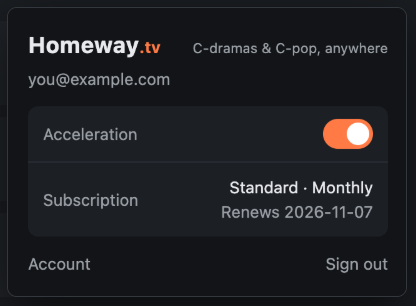
- Click the Homeway icon in the toolbar, then “Sign in”. Your browser opens the connect page on homeway.tv.
- Sign in to homeway.tv with an email verification code, then click “Allow this browser to use Homeway”.
- Go back to the extension pop-up and turn on the “Acceleration” switch. When the toolbar icon turns to color, it’s working.
- Open a video website and start watching. If a video page was already open before you switched it on, just refresh it.
In Firefox, if the pop-up says Homeway doesn’t have permission to access websites, click “Allow”.
FAQ
It says the proxy settings are controlled by another extension?
Only one extension at a time can manage your browser’s proxy settings. Turn off other proxy extensions on your browser’s extensions page and Homeway will start working again.
Does it work in Safari?
Not yet. On a Mac, install the extension in Chrome, Edge or Firefox.
Does the extension work with video apps installed on my computer?
No, the extension only works on web pages in the browser. For video apps on your PC, install Homeway for Windows.
Can I install it in a mobile browser?
No, the extension only supports desktop browsers. On your phone, install the Homeway app.
Can I use the extension on the free plan?
No. The free plan works on one phone only. You can use the extension during the 7-day free trial; after that, subscribe to Standard or Family to keep using it. Each browser counts as one device.
Can’t install it, or something won’t play? Email support@homeway.tv with your device model and system version and we’ll get back to you soon. You can also check Help & Support.
Other devices: TV & TV box · Android phone · Windows PC · Browser extension · iPhone & Mac